60 Minutes, Warby Parker, and Social Media Marketing
60 Minutes is one of the most popular news shows on television and also one of the most tweeted news programs. I do not usually watch it live but Sunday night they had an interesting segment on the eyeware industry which I’ve embedded below:
The segment was a little disturbing as it explained that one firm owns the vision insurance company EyeMed, the eyeglass shop Lenscrafters (along with Target Optical and others), and they make the majority of the eyeglass frames that are sold in these shops. However they also mentioned an online shop called Warby Parker that is not owned by the company. I had heard of them before but I’ve been wearing contacts most of the time so had not been in the market for eyeglasses. Since I am considering buying a new pair soon I was curious about them and their lens quality so I tweeted a question at them and surprisingly they tweeted a video response to my question about the quality of lens they use:
I thought that was pretty neat. Since I am a fan of start-ups as someone that works with them for my job, I am planning to give them a try. They offer the option to order some sample frames to try before you order your final pair. Unfortunately the 60 minutes segment seems to have caused them to run out of some styles, but hopefully they will be in soon. I am a little skeptical of how the quality will compare considering the low price point, but am willing to take a chance.
Read MoreWatching Television from the Computer Still is Not Easy
Earlier today I bought the Jon Stewart & Bill O’Reilly debate program that is airing tonight for $4.99. The catch with this is that it is only available online. This comes almost a year after comedian Louis CK released a comedy program in an online only format. The unique thing about this is that instead of using iTunes or other media stores that take a 30% cut of the sales the sellers are using regular payment companies like PayPal to accept a direct payment and then are offering their program without the digital rights management protections that iTunes usually uses. Therefore you are able to watch the content on nearly any device you own instead of being locked in to a particular ecosystem. These content producers are betting that by being more consumer friendly they can make more money than if they use the normal distribution channels.
Read MoreFixing the Tweetbot Permission Denied Error
I recently bought Tweetbot to replace the official twitter application on my iPhone and iPad. The app is great with many features that the regular twitter application lacks like the ability to mute hashtags or people in the timeline. It also makes it easier to navigate conversations on twitter and share links. I was happy with it until I got this error:
I was frustrated and tried the suggested fix of rebooting on their support page but saw nothing. However I finally went back through the @tweetbot feed on twitter where they recommended the following fix which worked:
http://twitter.com/mzagaja/status/250070415186214912
So try revoking tweetbot access from your twitter settings and then logging back in from the application and you should be good to go again. Hopefully this problem does not repeat itself.
Update: After a day the problem repeated itself. So I contacted their support again. Hopefully they will have other ideas.
Update 2: The folks at Tweetbot assure me that they are investigating this and it will be fixed soon. For more updates check out https://dev.twitter.com/issues/553.
Read More
How to Get iOS 6, Mac OS X, and Google Contacts to Sync Properly
Note: Updated on December 14, 2012 to reflect that GMail will not be working with Exchange anymore.
One of the most miserable parts of owning multiple gadgets and using multiple technologies is getting them to all play nicely together. Today Apple released iOS 6 and with it deep facebook and twitter integration that can confuse even the best of us. I have been spending the afternoon experimentally attempting to determine how all these different systems work together. This system assumes you are using an iPhone or iPad with iOS 6 and the latest version of Mac OS X. It also assumes you want all your contacts in GMail.
Important: Before starting this process you may want to backup your contact lists using the procedures appropriate to each account. You probably won’t lose anything provided you follow these instructions exactly and do not choose options to delete all your contacts, but it is better safe than sorry. More info: Export GMail Contacts, How to backup iPhone Contacts, Backup Apple Address Book.
The first step is to setup your iOS devices so you are only using iCloud for your contacts. It will make your life simpler. To see if you are using iCloud for your contacts you go into “Settings” and then “iCloud” and make sure it is setup. The switch to contacts should be set to on like the picture below:
Then you should set your Mail, Calendars, and Contacts section so that you are syncing only your mail to your Google account. After Google depreciated the use of Exchange I setup my e-mail with the official GMail App using instructions from The Verge. As a bonus using the official GMail app seems to use less battery than Exchange.
Next you’ll need to make sure OS X is setup for your accounts properly. Again you will run everything but e-mail through iCloud. You can also choose to setup Messages and Notes with Google. If iCloud is not yet setup on your computer you can follow the instructions from Apple. If you need to setup your Google mail on your desktop you can follow these instructions. I recommend using IMAP. If you already added your Facebook and Twitter accounts then your mail settings screen in OS X will look something like this:
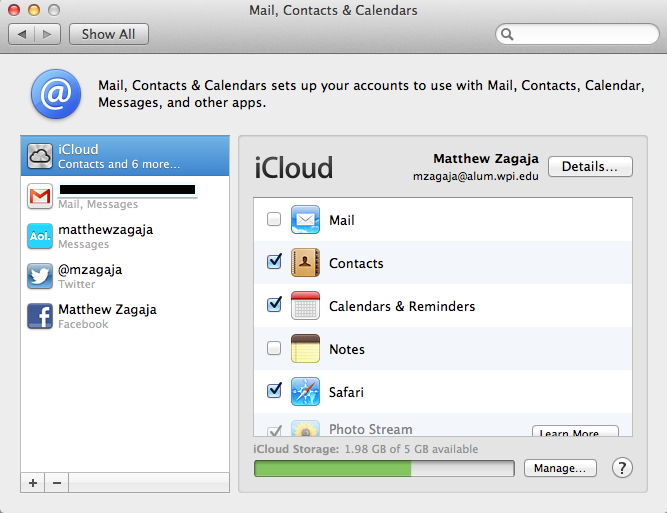 This is what the settings will look like in Mail, Contacts, and Calendars after you have set things up properly.[/caption]
Also you should make sure your Contacts app is setup to default to iCloud for contacts. You can do so by opening the Mac OS X Contacts app and clicking the “Contacts” menu in the upper left hand corner of the screen and choosing preferences. The first screen should look like:
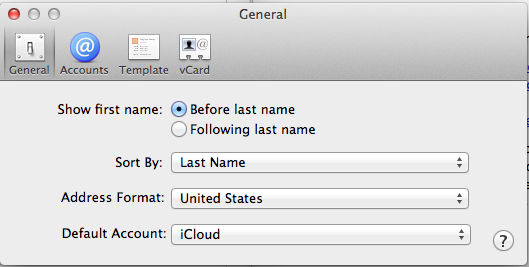 This is what the preferences in the contacts app should look like.
Once you have confirmed that setting then you are ready to move on.
The next step is to install Cobook. Cobook seems to do the best job of synchronizing Google’s contacts with iCloud and OS X. You should install it from the Mac App Store and then set it up to sync to your google account. Instructions on doing that are here. After you set it up with some luck you will start getting a sync going between your Google and Mac contacts. Changes made on your Mac or your phone will be sent to and from Google using this app. After it finishes syncing you may have to spend some time cleaning your contact information. A helpful tip is to open the Mac OS X Contacts app and go to the “Card” menu and choose “Look for duplicates” and it will merge them together. Additional cleaning to contact information is mostly a manual endeavor.
At this point you can feel free to go into the settings of your iOS device and Mac OS X and add your Facebook and twitter accounts. The OS will attempt to match your contacts. The twitter, facebook, and iCloud contacts will all be kept in separate “buckets” on the computer. However your contacts in Google and iCloud will have a link inserted into them so the computers know they go with certain facebook and twitter contacts. In other words, the information from facebook and twitter will not permanently alter your contacts. It will just be accessible to you in an easy manner.
This is how I have chosen to setup my devices. You have other options as well depending on your needs. Cobook can use its own facebook and twitter sync options to add info to the iCloud contacts that will sync with Google. However I am not sure if it will cause problems with duplicate data. If you have questions or suggestions feel free to leave them in the comments.
Read MoreiPhone 5 and Apple Event Thoughts
I think the biggest improvements are the aluminum back and sapphire lens for the camera. No more scratched up backs means that people with case free iPhones can sleep a little easier. The bigger screen, improved battery life, and LTE (faster mobile Internet) were expected improvements. The new earpods earbuds seem neat and I will probably buy a pair to review them. The new lightning connector was also expected but means that you will have to buy all new accessories or a bunch of those little dock adapters. Many of the rest of the improvements are in iOS 6 so iPhone 4S users will be able to enjoy important things like enhanced Siri functionality. My recommendation is if you have a phone upgrade to buy the iPhone 5. Power users should obviously get the 32GB or 64GB models. If you already got the 4S and do not have an upgrade this year, then you will not miss a whole lot while waiting for the iPhone 5S/6 to arrive next year.
Read More